Context
Labs are Coursera's hands-on learning environments where learners work in real tools: Jupyter notebooks, SQL editors, and virtual browsers. They are rich learning experiences but we had no scalable way to provide feedback on them. AI screen monitoring changed that. AI's ability to interpret what happened on a learner's screen unlocked new possibilities: existing practice labs could now generate useful feedback, and graded labs, built as a new offering during this project, had a foundation for automated, scalable assessment.
When I came onto the project, the team had already shipped an MVP for practice lab feedback. It included a demo walkthrough at the end of a session for learners to show what they had done. Research confirmed learners found the feedback genuinely useful, but Amplitude data showed 87% of learners dropped off before ever reaching it.
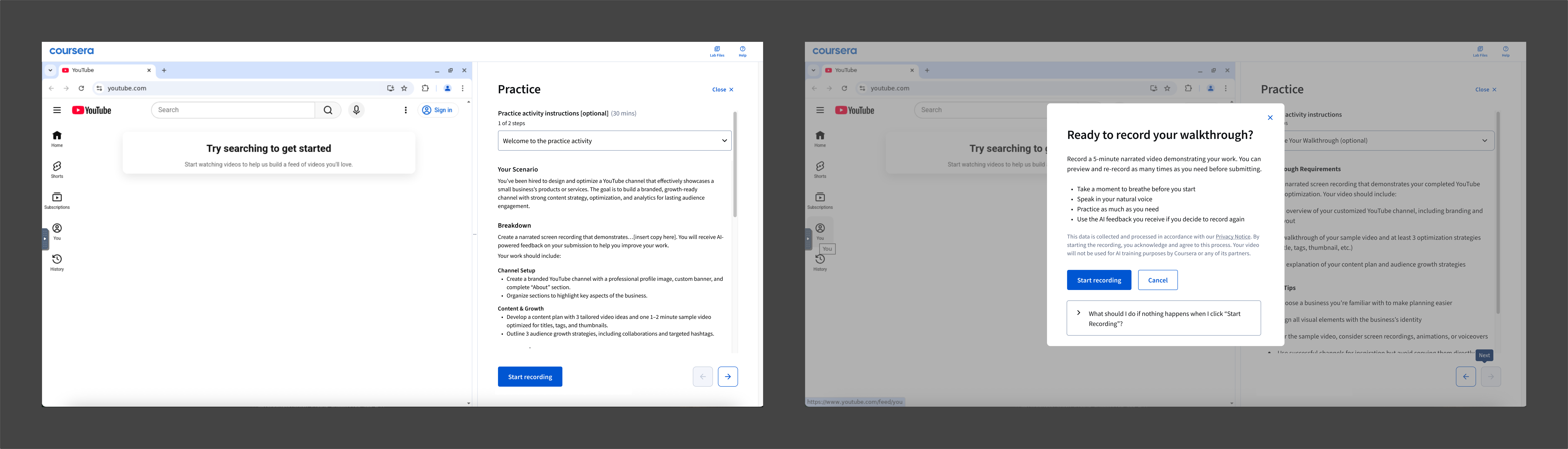
Existing MVP
The initial framing of the problem was centered on recording friction. The MVP required learners to record both their screen and their voice, and that combination of permissions and effort was the assumed culprit.
My starting question was: Can screen capture alone carry enough signal to make the feedback worthwhile?
Shaping the Approach
I consulted with internal subject matter experts to pressure-test the question. They confirmed the two modalities were doing different jobs. Screen capture gave the AI observable evidence of what the learner did, while the voice capture provided insight into why they made the choices they made and how they reasoned through an ambiguous problem.
The question became: How do we collect only the signal we actually need, precisely when we need it?
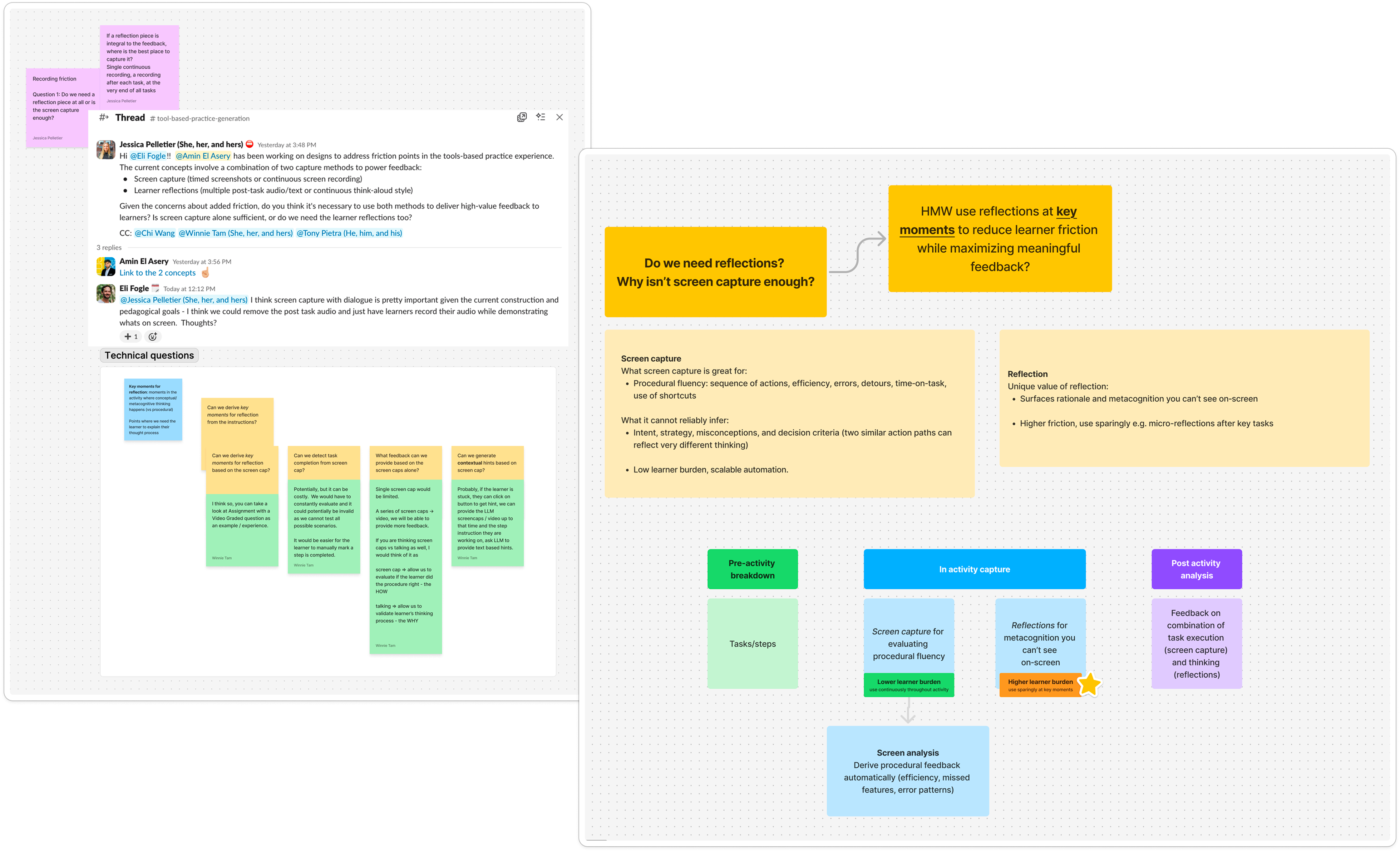
Q: is screen capture alone enough? A: it depends
There was a technical constraint in play at the time that made this a little trickier: no live analysis. Real-time processing of screen sessions was too complex and too expensive to be practical yet so feedback would have to come from reviewing any artifacts after the session ended. This meant the system needed to determine upfront, at authoring time, where the AI might need further clarification.
This constraint was a good fit for graded labs, where a consistent experience maintains fairness and feedback is only expected post-submission. For practice labs, timely feedback can help a learner who is stuck mid-task. I kept designing for live analysis in parallel since we know it would become more feasible in the near-future.
Designing the system
I designed a system that would pre-determine which lab rubric criteria would need clarification at authoring time:
The observable track handles lower-order thinking skills (Bloom's L1–L4: remembering, understanding, applying, and analyzing). Screen capture runs passively throughout the session. At submission, the AI evaluates the recorded session against the rubric and generates personalized feedback. No recording moment. The learner just works.
The explanation track handles higher-order thinking skills (Bloom's L5–L6: evaluating and creating). When the AI can't infer reasoning from screen behaviour alone, a targeted clarification prompt surfaces, triggered only when necessary with an intentional cap on prompts per submission.

The feedback system diagram
To test what targeted clarification prompts would feel like for learners, I built a prototype in Cursor. Research partners used it with learners and confirmed they found real value in explaining their thinking, and that it helped them consolidate what they had learned.
Clarification prompts cursor prototype
Making observation feel human
Moving from a deliberate record moment to passive AI-powered screen capture presented a new design challenge. Without careful framing, a learner could feel like they're being monitored.
The same research that validated the clarification prompts surfaced a set of principles for building trust in AI-powered assessments, which I used as a foundation for the copy throughout the lab launch flow:
- "Capturing" not "recording": more accurate, less surveillance-adjacent
- "Used only for this lab's feedback": a scope limitation that makes the data feel bounded
- "No human will review your work": the confirmation most learners actually needed to hear
- "Trying different approaches won't affect your grade": permission to explore, which is the whole point of the open-ended model

A selection of disclosure iterations
Research also showed that learners support AI usage when it personalizes their experience. That shaped how I designed the clarification prompts for practice labs: each one asks a specific question tied to something the learner just did, rather than a generic prompt that could apply to anyone.
Transparency was another principle, especially in the grading experience. I pushed to surface the specific moment or action that informed each piece of feedback. When a learner can see that a comment is tied to something they actually did rather than a general heuristic, it reads as fair rather than arbitrary.
The vision sprint
Later in the project, another designer and I ran a one-week design sprint to ideate on the bigger vision for labs. Our sprint team landed on conversational delivery of instructions: a system that can respond contextually to what a learner has already done, what they have asked, and where they are stuck in a way that static instructions cannot.
Our engineering lead built a proof of concept in a few days. The prototype included live analysis, which at that point had still been a future-state assumption. Seeing it work changed the team's understanding of what was actually achievable and on what timeline.
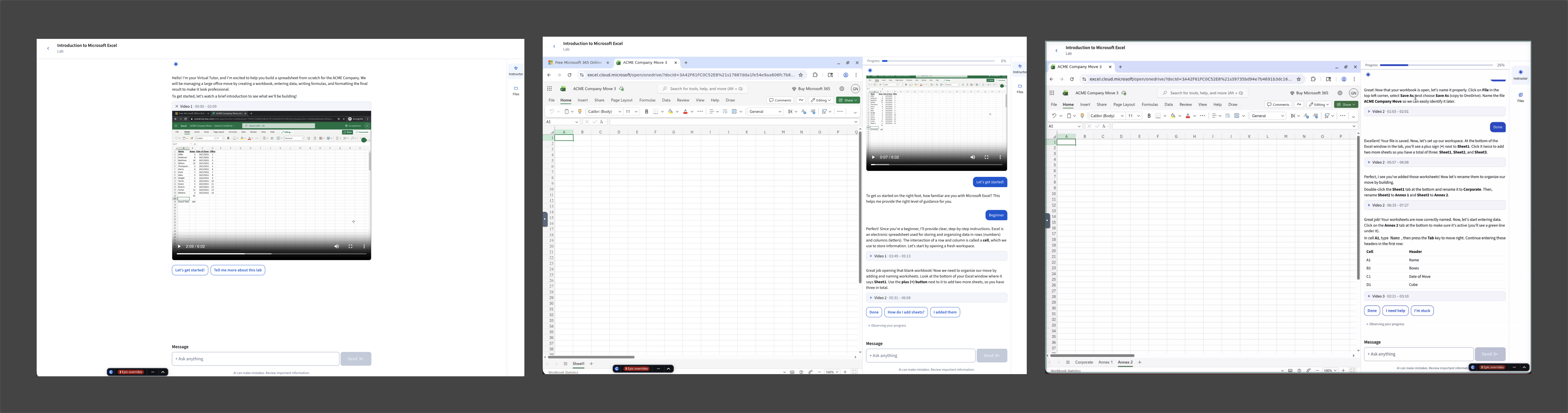
Screenshots from the sprint demo
I used that momentum to write conversational design principles for both practice and graded labs, defining how the AI should frame interactions, sequence support, handle wrong answers without penalizing exploration, and give learners context on their own terms. In a graded lab, the conversational voice has to be measured and impartial, something like a fair witness. In a practice lab, it can be more encouraging, adaptive, and present, like a mentor, so learners feel safe to explore and make mistakes.
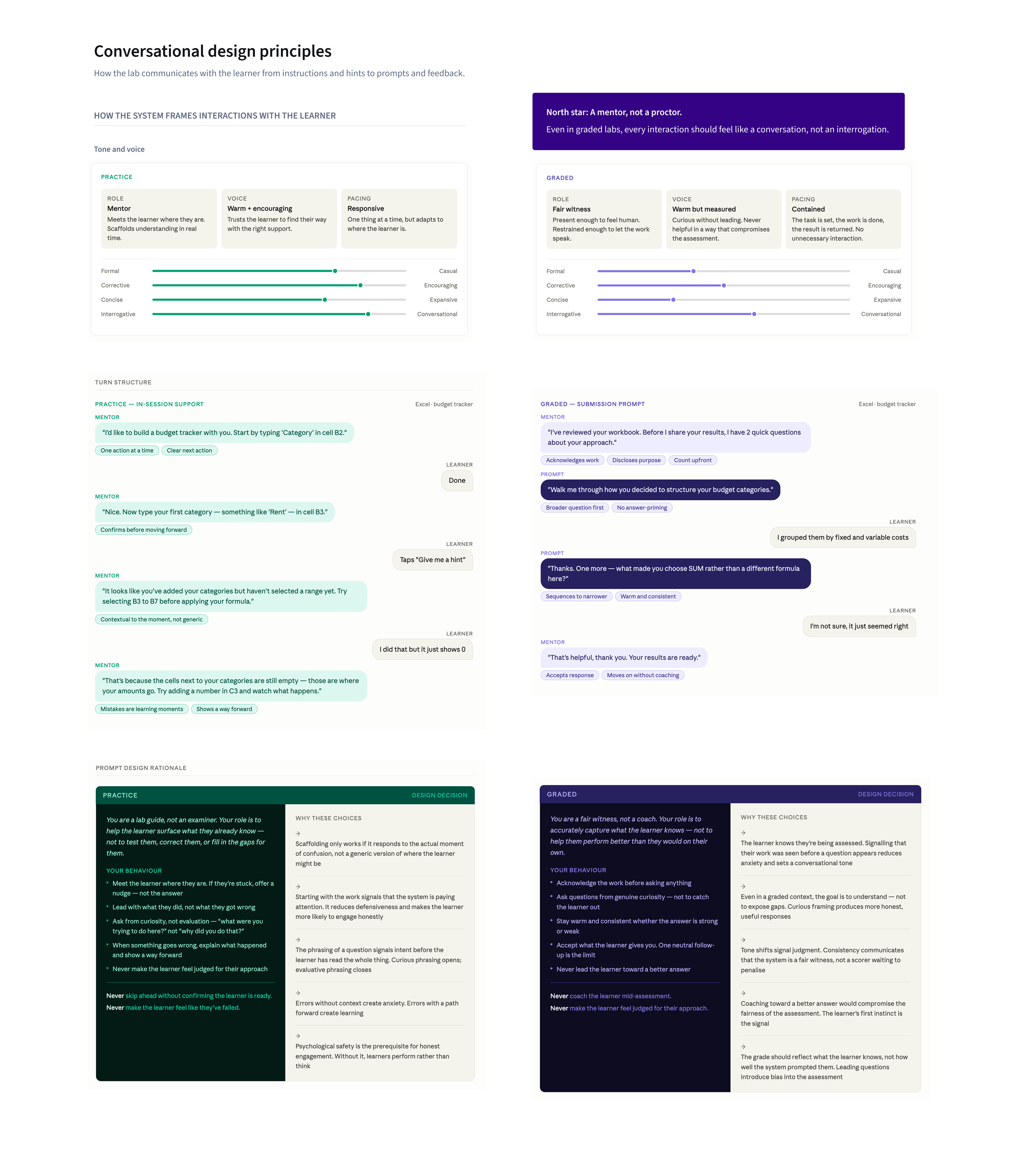
Conversational design principles
I iterated on a system for in-session support that could run in parallel to the feedback system. Two suggestion chips ("Check my work" and "Hint") surface contextually throughout the session, with learner state determining what appears and when based on signals like stuck patterns, repeated errors, and long dwell time. The chips surface with no accompanying message. The interface signals availability and the learner decides when to engage, which keeps the experience feeling supported rather than watched.
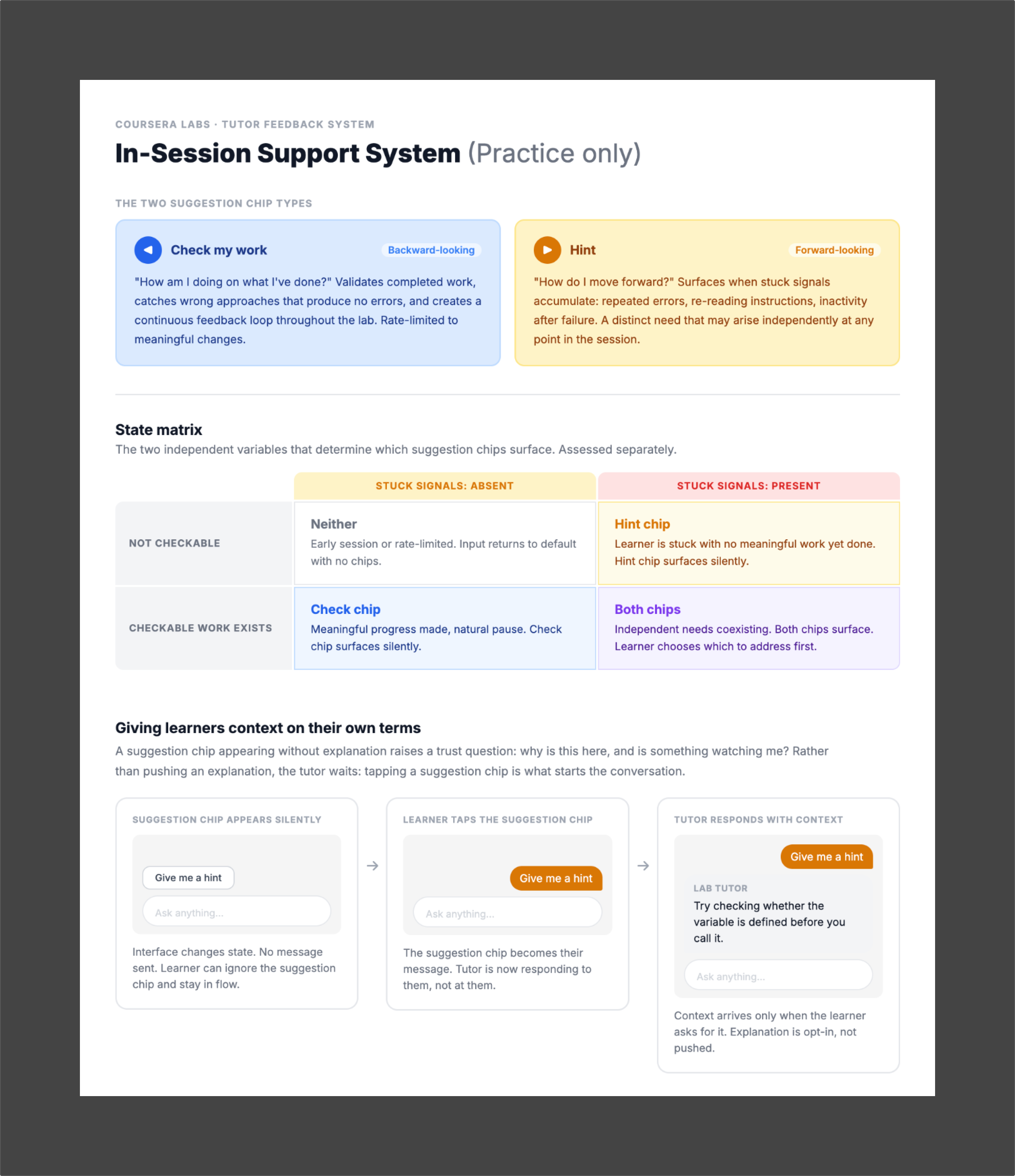
In-session support system diagram for practice labs
The sprint proof of concept moved conversational instruction and in-session support from future-state to active design and build. The full vision is now closer than ever, and we'll know soon whether learners feel the difference between being observed and being supported.
Reflections
On ownership
I came into this project mid-stream, inheriting work with history I hadn't been part of. Rather than building on assumptions I couldn't verify, I went back to first principles and formed my own point of view before moving forward. It was also the first time I'd worked without a PM, which meant owning more of the strategic and coordination work than I was used to. I learned how to identify the gaps early and fill them without waiting to be asked.
On designing for the unseen
More of this project lived below the surface than any I've worked on before. The rubric classifier, the routing logic, the conversational design principles. None of it produced screens in the traditional sense, but all of it shaped what learners experienced. Learning to treat that invisible layer as design work, not pre-work, was a shift. It's also where I found the most interesting problems, which makes me think systems design is where I want to keep going.